

How to Set Up a Creative Facebook Cover Video
Your Facebook cover video is more than mere decoration- it is a great power tool for telling your story and connecting with your audience. Unlike static images, videos grab attention in an instant as well. This guide will walk you through creating an engaging Facebook cover video that can boost your online presence.

Why Use a Facebook Cover Video?
A Facebook cover video will transform your page into a vibrant, interactive experience that will instantly grab the viewer’s attention. Videos are far more compelling than static images, so it is a great way to demonstrate your brand’s personality, values, and style interactively and memorably.
By using cover videos, you can promote new products or services, introduce your team, and showcase their skills. You can also give your audience a glimpse into your company’s daily life. For example, a fashion brand might create a cover video that takes viewers behind the scenes of a photoshoot. A tech startup could use a cover video to showcase the features of their new product.
Your cover video is the first thing your audience sees, setting the tone for their entire experience on your page. It gives them a sense of your brand and what they can expect from your content. Use visuals that grab attention, engaging music, and a clear message that resonates with your target audience to make it count.
Videos also play automatically, capturing attention right away. This feature can boost engagement, increase time spent on your page, and enhance your overall reach.
Key Considerations Before Creating a Cover Video
Dimensions and Specifications
To ensure that the cover video works well on your Facebook, a resolution of 820 x 462 pixels or 16:9 aspect ratio is necessary, and it can be in acceptable formats such as MP4 and MOV, the file size below Facebook’s limit, which is 1.75GB, and aiming for the most quality resolution, not more than 1080p.
Video Length
Facebook requires cover videos to be between 20 to 90 seconds long. Focus on delivering your message with urgency while maintaining the viewer’s attention. The first few seconds are critical for hooking your audience.
Mobile Optimization
With so many users accessing Facebook on their mobile devices, your cover video must look good on desktop and mobile platforms. Place essential elements in the center to avoid cropping on mobile displays, which usually have a 640 x 360-pixel resolution.
Brand Messaging
Cover videos should be representative of your brand identity. Use the appropriate visuals, music, and text that reflect your values. Simple is always better when approaching the cover video; avoid overloading it with information and keep your audience engaged.
Using Canva for Facebook Cover Videos
Canva is a user-friendly design tool that simplifies the creation of animated Facebook banners. Here’s how you can leverage Canva for your cover video:
Accessing Canva’s Templates
Canva offers a variety of pre-designed templates specifically for Facebook covers. These templates are optimized for Facebook’s dimensions, ensuring a perfect fit.
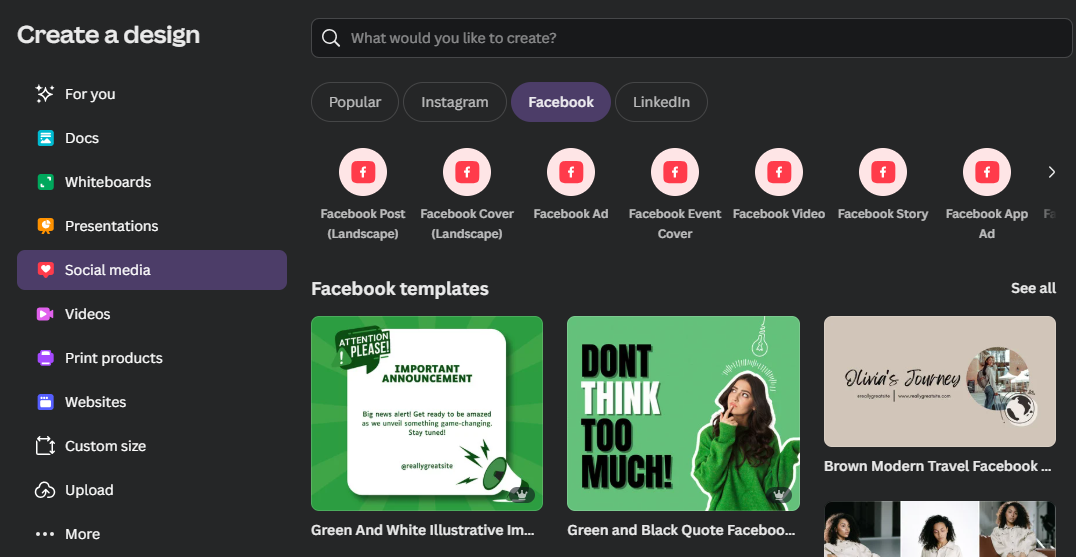
Customizing Your Design
- Adding Elements: Incorporate text, images, and graphics to align with your brand’s identity.
- Animating Elements: Canva allows you to animate individual elements within your design. This feature enables you to create dynamic and engaging visuals without the need for advanced video editing skills.
Exporting Your Video
Once your design is complete, export it as an MP4 file, which is compatible with Facebook’s cover video requirements.
Planning Your Creative Facebook Cover Video
Brainstorm Ideas
Start by setting a goal for your Facebook cover video. Do you have a product launch, introduce your team, or have customer testimonials? Create an engaging video incorporating seasonal themes, animations, or behind-the-scenes glimpses of your workspace.
Storyboard Creation
A storyboard breaks down the events of your video into a map of scenes one by one, which helps illustrate how each is connected to complete a cohesive narrative. Planning always simplifies your production, takes less time over editing, and ensures that what you have is continuous from start to finish. Please do not waste this time; spending it now could save you tons of effort afterward.
Scripting and Visual Elements
Craft a concise script that supports your visuals. Include engaging text overlays or subtitles to emphasize key points. Use transitions and effects in moderation to maintain a polished look.
Producing the Video
Tools and Software
You don’t need to be a professional videographer to create a stunning Facebook cover video. Tools like Canva, Adobe Premiere Pro, or iMovie provide features that are easy to use for video creation and editing.
Recording Tips
Invest in a good camera or smartphone with HD capabilities. Ensure the setting is lit correctly and maintain steady framing to appear professional. Invest in a quality microphone to make the audio crisp and professional.
Editing for Social Media
During editing, always crop the video to the correct dimensions. Add appropriate overlays, animations, and music that align with your brand style. Finally, keep quality optimized for the file size for a smooth upload. Design your video with a seamless transition between the end and the beginning to provide a smooth viewing experience, as Facebook cover videos loop by default.
Uploading and Setting Up the Video on Facebook
Step-by-Step Guide
- Navigate to your Facebook page.
- Select Upload Video and choose your file
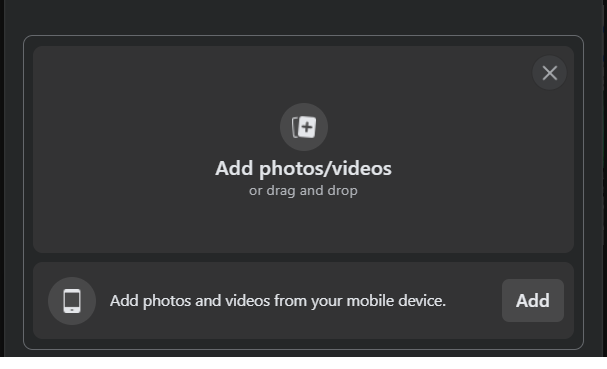
- Adjust the positioning of your video if needed.
- Check the video to confirm it displays correctly.
- Change the thumbnail according to your reference.
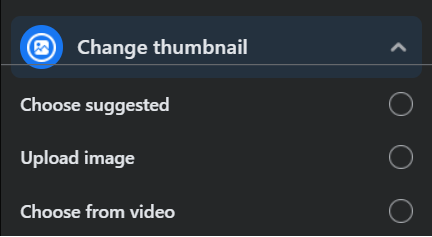
- Click Save Changes to finalize.
Testing the Video
Once uploaded, test your video on various devices to ensure it’s responsive. Check playback quality and adjust if necessary.
Tips for Optimizing Your Cover Video
- Hook Your Audience Early: The first 3-5 seconds should grab attention with captivating visuals or text.
- Silent Playback: Since cover videos autoplay without sound, use clear visuals, engaging text overlays, and expressive imagery to communicate your brand’s message.
- Use Captions: Include subtitles to ensure accessibility for all viewers.
- Refresh your cover video regularly to keep your content relevant and engaging.
- Analyze Performance: Track metrics such as views and engagement to better understand what resonates with your audience.
Transform Your Facebook Page with Video Now!
A dynamic Facebook cover video is the best way to further your brand’s online presence. It captures attention, delivers the message clearly, and differentiates you from the competition. Using best practices today can generate high visual appeal around your messaging to capture people’s hearts. Start creating your killer cover video today, and get ready to see your engagement shoot through the roof!
SuiteEdge helps businesses succeed on social media with tailored expertise in Social Media and Reputation Management. Offering customized solutions to boost a brand’s online presence, SuiteEdge creates engaging Facebook cover videos and manages reputation across platforms. With effective and sustainable strategies, SuiteEdge takes social media performance to the next level.
To stay current with us, please follow our Facebook and Instagram pages.